How to Invite Friends in Neon Abyss 2: A Multiplayer Guide
Learn how to team up with friends in Neon Abyss 2. Discover the current state of online co-op and how to utilize Steam features for your cyber-roguelike adventures.
Published: Neon Abyss 2 Wiki Editorial Team
Table of Contents
Diving into Co-op: Playing Neon Abyss 2 with Friends
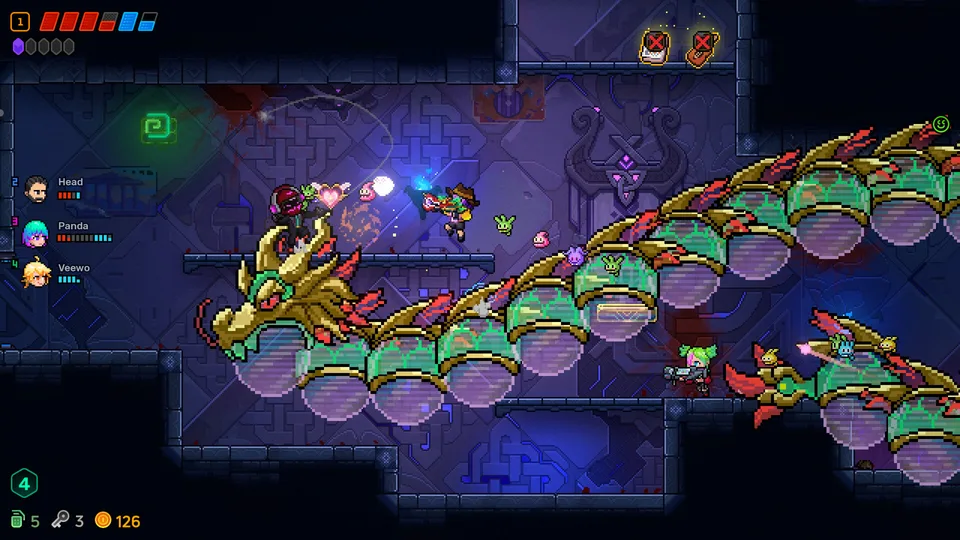
Neon Abyss 2 brings a fresh, chaotic energy to the roguelike genre, and one of its most anticipated features is the inclusion of online co-op for up to four players. Whether you are navigating the cybernetic chaos of the Abyss or experimenting with wild item synergies, tackling the challenges with a squad fundamentally changes the gameplay dynamic.
If you are wondering how to get your friends into your lobby, the process is primarily handled through Steam’s integrated social features. Because the game is built for the Steam platform, you do not need to rely on complex in-game email or invitation systems. Instead, you can leverage the familiar Steam overlay to manage your party.
Setting Up Your Multiplayer Session
When you are ready to start a session, the most reliable way to invite friends is through the Steam Friends List. This method ensures that your friends receive a direct notification and a link to join your specific game instance.
Launch the Game: Ensure you are at the main menu or in a lobby screen where multiplayer is enabled.
Open Steam Overlay: Press Shift + Tab on your keyboard to bring up the Steam overlay.
Access Friends List: Locate the friend you wish to invite in your Friends List.
Send Invite: Right-click on your friend's name and select "Invite to Play" or "Invite to Game."
Confirm: Once your friend accepts the invitation, they will be connected to your lobby. Ensure your lobby settings are set to "Public" or "Friends Only" to allow them to join without issues.
Tip
If you do not see the "Invite to Game" option, ensure that your game is fully updated via the Steam client. Occasionally, if you and your friend are on different versions of the game, the invitation feature may be grayed out or unavailable.
Why Play Co-op in Neon Abyss 2?
Playing solo is a classic roguelike experience, but the co-op mode in Neon Abyss 2 offers a different level of strategic depth. The game features unlimited item synergies and diverse combat styles, which become significantly more interesting when shared with other players.
Tactical Advantages of a Squad
Synergy Combinations: With up to four players, you can combine different weapons and abilities. One player might focus on melee combat with a saber, while another handles crowd control with dragon-like creatures or heavy weaponry.
Resource Management: In a group, you can coordinate who picks up specific items or crystals. This allows for specialized builds, where one player might focus on health/defense, while others prioritize damage output.
Shared Survival: Roguelikes are notoriously difficult. Having teammates who can cover your back—or revive you depending on the specific mechanics of the current run—can be the difference between a successful floor clear and a game over.
Combat Variety
The game encourages experimentation. Whether you prefer smashing enemies with a bat or unleashing botanical attacks, co-op allows your team to cover multiple combat styles simultaneously, creating a more balanced party.
Troubleshooting Common Connection Issues
If you or your friends are having trouble connecting, it is usually due to network settings or software conflicts rather than a bug in the game itself.
Check Connection Status: Ensure all players have a stable internet connection. High latency can cause desyncs in fast-paced roguelikes.
Verify Game Files: If the game crashes when a friend joins, right-click the game in your Steam Library, select "Properties" > "Installed Files" > "Verify integrity of game files."
Firewall Settings: Ensure your firewall is not blocking Steam or Neon Abyss 2 from communicating over the network.
Update Steam: Make sure your Steam client is up to date to ensure the "Invite to Game" feature functions correctly.
Warning
Do not use third-party software to "force" connections or bypass regional restrictions, as this can lead to unstable gameplay or potential account issues. Always stick to the official Steam integration for the best experience.
Finding Teammates: The Official Community
Sometimes your regular gaming group might be offline, or you might want to find players who are at a similar skill level. The developers, Veewo Games, maintain an active community presence.
According to the official Neon Abyss 2 website, the best way to stay updated, report bugs, and find other players is by joining their official Discord server. Community hubs are often the best places to find dedicated groups who are looking for specific types of playstyles, whether you are a casual player looking for a relaxed run or a hardcore fan aiming to clear the hardest floors of the Abyss.
FAQ: Frequently Asked Questions
Can I play co-op with players on other platforms?
Currently, the information regarding cross-platform play is limited. Neon Abyss 2 is primarily verified for the Steam platform. It is recommended to stick to Steam-to-Steam connections for the most stable multiplayer experience.
Is there an in-game lobby browser?
While the game features online co-op, rely on the Steam Friends list as your primary method for inviting and joining friends. Always check the main menu for any updates or new social features added in patches.
Does progress carry over in co-op?
Neon Abyss 2 is a roguelike, meaning many items and upgrades are specific to individual runs. However, permanent progression or meta-progression elements are tied to your account. Always ensure your save is synced to the Steam Cloud to avoid losing progress.
By leveraging the Steam social ecosystem and coordinating with your team, you can fully enjoy the "cybernetic chaos" that Neon Abyss 2 has to offer. Whether you are experimenting with new weapon synergies or just trying to survive the next floor, playing with friends is the definitive way to experience the latest entry in the series.