Neon Abyss 2 Co-op Guide: How to Play Online Multiplayer
Learn how to access and master 4-player online co-op in Neon Abyss 2. Discover essential tips for team coordination and synergy building in this roguelike sequel.
Published: Neon Abyss 2 Wiki Editorial Team
Table of Contents
Understanding Online Co-op in Neon Abyss 2
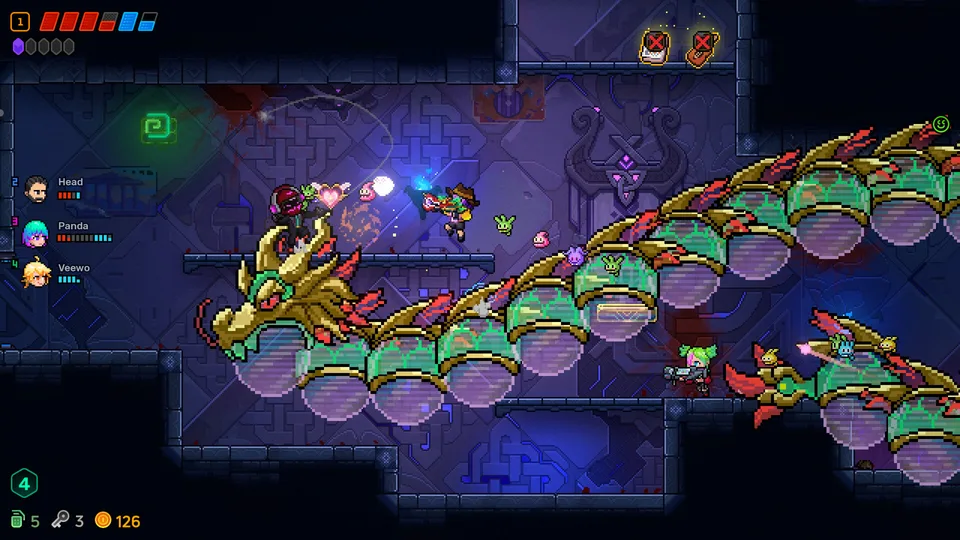
Neon Abyss 2 marks a significant evolution for the franchise by introducing robust online multiplayer support. Unlike the single-player-focused experience of the original title, this sequel allows up to four players to tackle the procedurally generated depths of the Abyss together. Whether you are coordinating combat strategies or hunting for hidden treasures, the transition to a multiplayer environment changes how you approach every run.
Based on official store information, the game features seamless online connectivity, allowing players to join forces to multiply their unique synergies. One of the most distinct features of the co-op mode is the ability for players to split up and explore different rooms on the same map simultaneously. This design choice encourages efficient clearing of floors but requires a high level of team communication to ensure no one is left under-equipped when facing a boss.
Mastering Team Synergy and Combat Styles
In Neon Abyss 2, combat is defined by diverse styles and item synergies. When playing in co-op, the complexity increases as you must account for your teammates' builds. Because item drops are random, your group will need to decide who receives specific power-ups to maximize the party's overall damage output.
Tip
Coordinate Your Builds: Some items may provide significant buffs to specific combat styles, such as melee-focused bats or saber users. Communicate with your team before picking up shared loot to ensure your party’s strengths complement each other rather than overlapping.
Community reports indicate that players can experiment with various combat styles, from commanding fierce creatures to unleashing elemental attacks. Since there is no hard limit on how many items a single player can wield, the potential for chaotic, screen-filling synergy combinations is immense. However, keep in mind that resource management—specifically keys and grenades—is a shared challenge, and poor planning can leave your team unable to open critical chests or shortcuts.
The Faith System and Resource Management
The new "Faith System" is a critical mechanic for managing the unpredictable nature of the Abyss. If you find yourself in a difficult situation, this system allows you to spend resources in shops, recruit Hatchmon, or engage in high-risk games of chance.
Resource Prioritization: Always check your grenade count before attempting to clear environmental obstacles.
Hatchmon Evolution: Focus on evolving your cute companions into powerful allies to provide passive support during intense boss fights.
Faith Spending: Use the Faith System strategically when a run feels stagnant; it is often the best way to pivot your build when RNG is not in your favor.
According to player experiences, it is easy to become confused by the abundance of items and currency types. As a new player, remember that some items require specific conditions to activate, such as having a certain amount of heart containers or specific types of eggs. Always take a moment to inspect your inventory if you are unsure about what a new pick-up does.
Strategies for Boss Floors and Difficulty
As you progress through the floors, the difficulty scales significantly. The boss rooms in Neon Abyss 2 require tight coordination. In co-op, if one player goes down or is low on health, the rest of the team must compensate.
Scout the Map: Use the ability to explore different rooms to locate the boss room early without triggering unnecessary combat.
Pool Your Resources: If a shop appears before a boss, pool your coins and keys to ensure at least one or two players have top-tier gear.
Focus Fire: During boss encounters, designate roles—some players should focus on clearing adds (smaller enemies) while others focus on the boss's weak points.
If you are playing on the Steam Deck, the game is fully verified, ensuring a smooth experience even during high-action sequences. However, regardless of the platform, the key to success is staying together when the screen becomes crowded with projectiles.
FAQ: Frequently Asked Questions
Can I play Neon Abyss 2 in local co-op?
The current official information highlights "Online Co-op" as the primary multiplayer feature. Always check the Steam store page for the most recent updates on local play support.
Is progress shared among all players?
Progress, such as unlocked items and character growth during a run, is shared in the sense that you are working toward a common goal. However, individual character builds are managed by the player who picks up the items.
How do I invite friends to my game?
You can utilize the standard Steam friends list integration to invite players directly to your lobby through the game’s main menu. Ensure your network settings are set to allow public or friends-only connections.