Neon Abyss 2 Multiplayer: Does It Support Crossplay?
Explore the 4-player online co-op features in Neon Abyss 2. Learn about the current state of cross-platform play and how to master the roguelike chaos with friends.
Published: Neon Abyss 2 Wiki Editorial Team
Table of Contents
Understanding Multiplayer in Neon Abyss 2
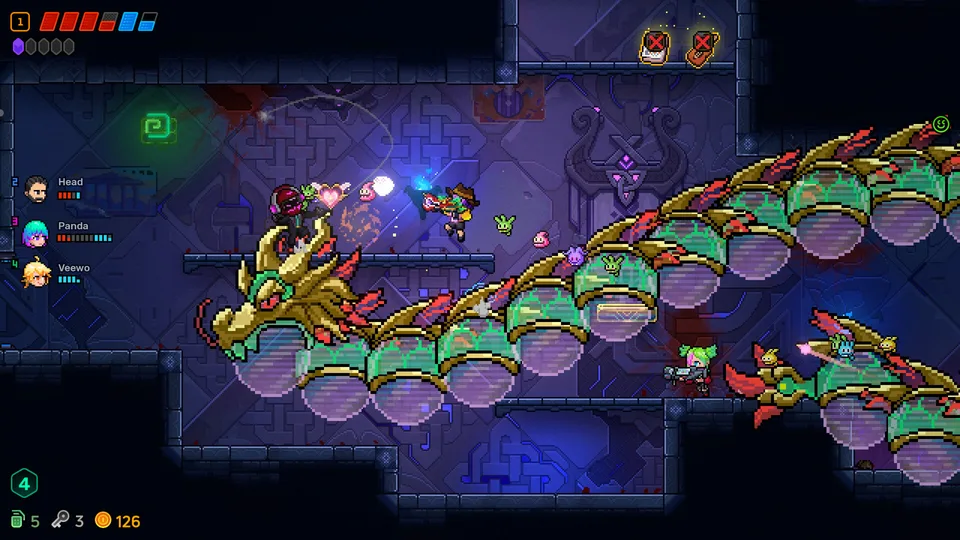
Neon Abyss 2 marks a significant evolution in the franchise, transitioning from a primarily single-player experience to one that heavily emphasizes cooperative play. With the 1.0 launch on October 7, 2026, the developers at Veewo Games introduced a comprehensive 4-player online co-op mode. This shift changes the fundamental flow of the game, turning the solitary, high-stakes roguelike dungeon crawl into a chaotic, synchronized team effort.
If you are looking to dive into the Abyss with friends, the game provides the infrastructure to support up to four players simultaneously. This is not merely a tacked-on feature; the game design accounts for multiple players through specific mechanics like shared item synergies, the Faith System, and the ability to split up and explore different map sectors to maximize efficiency.
The Crossplay Question
One of the most common questions for modern roguelikes launching on multiple platforms is whether crossplay is supported. Based on the current official release information for Neon Abyss 2, the game is confirmed to be available on Steam and consoles. However, there is no explicit confirmation or documentation regarding cross-platform play between these ecosystems.
Tip
Managing Expectations: Because crossplay has not been explicitly confirmed by the developers, it is safest to assume that multiplayer matchmaking is restricted to players on the same platform (e.g., Steam players matching with other Steam players). If you are buying the game specifically to play with friends on different hardware, we recommend checking the official Veewo Games Discord or the Steam Community Hub for the most recent updates on cross-platform functionality.
Mastering 4-Player Online Co-op
The co-op experience in Neon Abyss 2 is designed to be more than just "more guns on screen." It encourages strategic coordination. When you enter a run with a full squad, your team’s success depends on how well you manage your resources and combat styles.
Strategic Coordination
The game allows players to explore different rooms within the same map. This is a critical tactical advantage. Instead of moving as a slow, single-file line, your team can split up to clear rooms faster, gather loot, and uncover secrets.
Communication is Key: Use voice chat or in-game signals to coordinate who is hunting for loot and who is heading toward the boss room.
Synergy Stacking: Since item drops are random, try to specialize. If one player picks up items that enhance melee damage, another player might focus on ranged or "Hatchmon" (companion) upgrades. This ensures that no single player is hoarding all the power-ups while others lag behind.
The Faith System
The new Faith System is a game-changer in co-op. It acts as a safety net and a strategic resource. When the Abyss gets too difficult, players can spend Faith in shops or use it to recruit more Hatchmon. In a 4-player scenario, managing your collective Faith is crucial. Decide as a team whether to save for a major purchase or spend small amounts to keep everyone alive during a particularly brutal boss fight.
How to Optimize Your Co-op Run:
Define Roles Early: Before starting, check your loadouts. Ensure you have a mix of melee and ranged capabilities.
Split and Conquer: Use the map to identify isolated rooms. Send players to clear them simultaneously to maximize gold and item drops.
Manage Faith Together: Don't let one player spend all the team's Faith. Coordinate purchases in the shop to ensure everyone gets necessary upgrades.
Hatchmon Evolution: Focus on evolving your cute creatures into powerful allies. A team with four evolved Hatchmon can output significantly more damage than a team of four players without them.
Technical Requirements for Multiplayer
To ensure a smooth experience during your online sessions, your PC must meet the minimum requirements provided by Veewo Games. Since the game features fast-paced, bullet-hell style combat, performance stability is essential for multiplayer synchronization.
System Requirements Check:
OS: Windows 10 64-bit is required.
Processor: A Dual Core 2.4 GHz processor is the baseline.
Memory: 8 GB RAM is recommended to handle the chaos of 4-player co-op.
Graphics: A GeForce GTX 950, Radeon R7 360, or Intel HD Graphics 630 is sufficient.
DirectX: Version 12 is necessary for the game's visual and performance features.
The game is also verified for the Steam Deck. While the Steam Deck provides a portable way to play, keep in mind that online co-op requires a stable internet connection. If you are playing on the go, ensure your Wi-Fi is strong to avoid desync issues during high-intensity combat sequences.
Frequently Asked Questions
Can I play Neon Abyss 2 in single-player mode?
Yes. While the 4-player online co-op is a major highlight, the game is fully playable as a single-player experience. The difficulty and scaling adjust to accommodate your team size.
Does the game support local co-op (couch co-op)?
The current official features highlight "Online Co-op." Always check the Steam store page "Features" section for the most current updates, as developers may update the game post-launch.
Are there accessibility options for multiplayer?
Yes, Neon Abyss 2 includes accessibility features such as Adjustable Difficulty and custom audio controls, which can be configured to help all players enjoy the experience regardless of their specific needs.
What happens if a player disconnects?
As with most online roguelikes, disconnecting mid-run can be disruptive. Ensure you have a stable connection. If you are the host, check your network settings to ensure your firewall is not blocking the game's connection to Steam servers.
Community and Support
The Neon Abyss franchise thrives on community feedback. If you encounter issues with multiplayer connectivity, the best course of action is to utilize the Steam Community Hub. The developers, Veewo Games, are active and often monitor discussions regarding bugs, balance, and feature requests.
If you are looking to find teammates or discuss builds, the official Discord server is the primary hub for the community. Joining these spaces is the most reliable way to stay updated on future patches, potential crossplay announcements, or seasonal events that might add new layers to the multiplayer experience. Remember, the Abyss is always changing, and staying connected with the community will help you uncover the deepest secrets of the game.